


Hardee’s®
4.68.87K Reviews
App Specs
- Version
- 5.6.0
- Updated On
- License
- Free
- Downloads
- 1,000,000+
- Developer
- CKE Restaurants
- Categories
- Food & Drink
- Platform
- Android, iOS
Screenshots
 Analysis by AppCompare
I tend to find a restaurant app most useful when I’m hungry, short on time, and already know roughly what I want. Hardee’s® is built around that practical moment: it gives you a way to browse and place a mobile order for the chain’s food rather than making you start with a general search for somewhere to eat. I’d treat it as a handy ordering companion for people who already choose Hardee’s, not as a reason to change where they eat.
A straightforward way to place an order
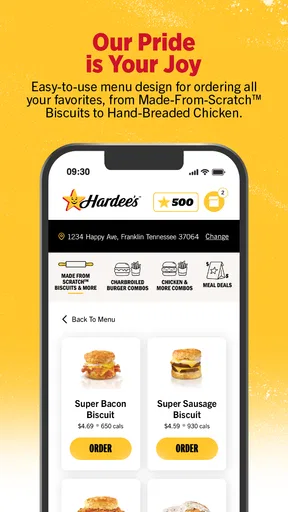
The basic routine is simple: open the menu, decide what sounds good, review the meal, then arrange the order through the app. That can be more comfortable than trying to make choices while standing at a counter, especially if you are ordering for more than one person. I like being able to think through the meal before I commit, though the value of doing that depends on whether a participating restaurant is convenient for your route.
Hardee’s covers familiar fast-food occasions, from a burger run to breakfast or a quick dessert stop. One useful habit is to settle the group’s choices before opening the menu. If everyone is still deciding, the app does not make that conversation disappear; it simply moves it onto a screen. But when one person is collecting orders, browsing first can make it easier to check that each person’s choice is represented before sending anything through.
This is a free Food & Drink app from CKE Restaurants, and its focus is clear: ordering Hardee’s food. The app has a 4.6 average from around 24,000 ratings, with over a million installs. Those figures suggest it has found an audience, but I would still judge it by the practical details that matter to you: whether your nearby restaurant supports the ordering flow and whether ordering ahead fits your plans.
Small habits that make ordering smoother
Before building a complicated order, I’d check the menu and make sure the items I want are available for the meal occasion I have in mind. That is especially useful when switching between breakfast and later meals, or when ordering for someone with a specific preference. A menu on a phone is convenient, but it is still worth reviewing the finished order carefully rather than assuming every selection carried over as intended.
For a repeat visit, the app’s past-order record can save time. I’d use it as a starting point, not as a substitute for checking the order: a familiar meal may not suit the same situation every time, and the details deserve a quick look before checkout. This is a better shortcut than trying to remember every item from memory, while still leaving room to change the meal when you want something different.
Order-ahead is most useful when it matches a real stop in your day. For example, if I’m already driving past a Hardee’s on the way home, I can decide what I want before arriving and avoid spending that stop working through the menu at the counter. I would not build a tight schedule around an app order without allowing for the ordinary uncertainty of travel and pickup. The convenience is in preparing the order, not in making every part of a meal run predictable.
Worth Reading Before You Choose

EA SPORTS FC Mobile 26 Is a Bigger Football Game, but It Takes Time

Flipboard Shows What News Apps Must Do Beyond the Feed

Switching to Android Auto Means Rethinking Your Driving Routine

Google Calendar Makes a Crowded Week Easier to Manage

Ludo King Makes the Most of the Minutes Between Plans

Baby Panda World Brings Quick Play to Modern Phones, but Its Game Library Feels Busy
Where it fits among other ways to order
Compared with ordering in person, the app gives you more time to consider the menu and can be useful when you prefer to place an order before reaching the restaurant. Going inside still makes more sense if you want to ask staff a question, make a decision after seeing the menu, or simply do not want to use your phone for the purchase. Neither approach is automatically better; it depends on whether you value advance planning or a face-to-face exchange more in that moment.
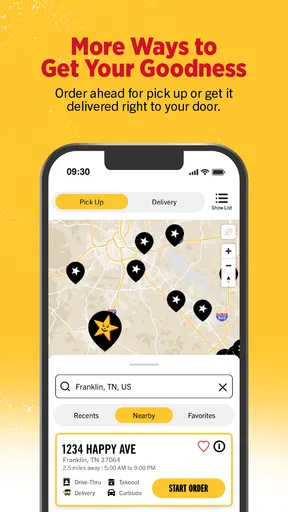
Restaurant delivery services are another familiar option, but they are not the same as ordering directly through a restaurant’s own app. Delivery availability can depend on where you are, and the Hardee’s app’s delivery option is likewise location-dependent. If delivery is essential, check what the app offers for your address before planning the meal around it. If you are already near a restaurant and can collect your food, pickup may be the more direct choice.
People who regularly eat at Hardee’s are the clearest fit. Occasional visitors can still use the app when they want to browse or arrange an order, but it is less compelling if you mostly eat elsewhere or prefer to make spontaneous choices at the counter. It is also not the right tool for comparing menus across different chains: its purpose is to help with Hardee’s orders, not to act as a general restaurant guide.
What to check before relying on it
Location matters more than it might seem. Before spending time customizing a meal, confirm that the restaurant you intend to visit is the one selected for the order. This simple check helps avoid a mismatch between your route and the pickup location. If you are choosing delivery, check the available option for your location as well; the fact that delivery exists in the app does not mean it will be available everywhere.
I would also keep expectations grounded around customization. Being able to adjust an order is useful, but it does not mean every possible change will be offered or that the app replaces a conversation with restaurant staff for a complicated request. For a straightforward preference, selecting an available option is convenient. If your needs are unusual or important to get exactly right, it is sensible to verify the order details and use another way to contact the restaurant if needed.
Hardee’s is rated for Everyone, and the current version is 5.4.0, with Android 10 as the minimum operating-system requirement. It was released on July 27, 2021. Those details make it easier to check basic device compatibility, but I would still make sure my phone’s software and the app are up to date before relying on mobile ordering during a busy day.
The app’s strongest case is not that it changes fast food; it is that it can reduce the small bits of friction around a familiar order. I’d keep it installed if I visited Hardee’s often enough to benefit from browsing ahead and revisiting past choices. If I only stopped there once in a while, I would use it when a specific order made advance planning worthwhile rather than expecting it to become part of every meal routine.
Getting Started with the App
First off, downloading the Hardee’s® app is a breeze. Whether you’re on Android or iOS, a quick trip to your app store, and you’re set. Once installed, you’re greeted with a clean, user-friendly interface that doesn’t overwhelm you with too many options right off the bat. It’s straightforward, which I appreciate, because who needs extra hassle when you’re hungry?
Features Worth Exploring
Now, let’s talk features. The ordering process is super intuitive. You can easily browse through the menu, which includes everything from their iconic Thickburgers to their breakfast burritos. One feature that stood out to me is the customization option. You can tweak your order to your heart’s content. Want extra cheese or hold the pickles? No problem. It’s all about getting your meal just the way you like it.
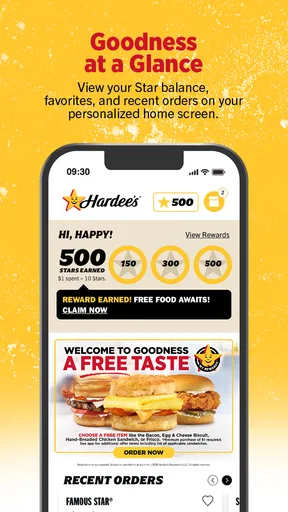
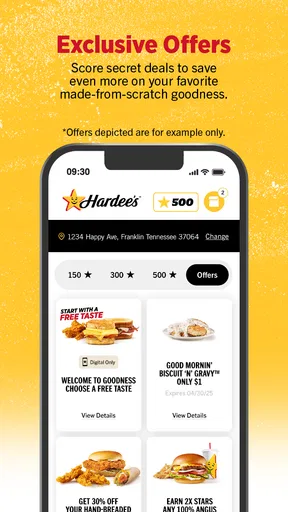
Another cool feature is the rewards program. As you place orders, you earn points that you can redeem for free food. Who doesn’t love a good deal? Plus, the app sends you exclusive offers and promotions, so you’re always in the loop with the latest deals. I’ve already snagged a few free sides and desserts, which makes the app worth it for the savings alone.
Order and Pickup Made Easy
One of my favorite things about the Hardee’s® app is the order ahead feature. You can select your items, pay directly through the app, and choose a pickup time that suits your schedule. It’s perfect for those busy days when you’re running errands and want to skip the line. Just pop in, grab your order, and you’re out. Quick and painless.
For those who aren’t in the mood to go out, the app also offers delivery options. Depending on your location, you can have your meal brought right to your doorstep. It’s like having your cake and eating it too, except with burgers.
The User Experience
The design of the app is sleek and modern, but what really makes it shine is its functionality. I haven’t experienced any glitches or crashes, which is a win in my book. Navigation is smooth, and everything is laid out logically. Even if you’re not tech-savvy, you’ll find it easy to order your favorite meal.
The app also keeps a record of your past orders, which is a lifesaver. If you’re like me and have a go-to order, you can easily reorder with just a few taps. No need to remember what you had last time; the app does it for you.
Final Thoughts
All in all, the Hardee’s app is a solid companion for anyone who frequents this fast-food chain. It simplifies the ordering process, offers great deals, and rewards your loyalty. Whether you’re a die-hard burger fan or just someone who appreciates convenience, this app is definitely worth checking out.
So, next time you’re in need of a quick bite, why not give the Hardee’s app a try? It’s like having the ultimate burger assistant right in your pocket. Happy munching!
Pros
- User-friendly interface enhances navigation.
- Quick access to exclusive deals and offers.
- Effortless mobile ordering saves time.
- Customizable menu options for dietary needs.
- Secure payment options for peace of mind.
Cons
- Limited availability in certain regions.
- Occasional app glitches reported by users.
- Notifications can be overly frequent.
- Requires constant internet connection.
- No loyalty rewards program integrated.
FAQs for Hardee’s®
What features does the Hardee’s® app offer?
The Hardee’s® app provides a range of features designed to enhance your dining experience. Users can browse the menu, customize orders, find the nearest location, and receive exclusive deals and offers. Additionally, the app allows you to place orders for pickup or delivery, ensuring a convenient and streamlined process.
Is the Hardee’s® app available on both Android and iOS?
Yes, the Hardee’s® app is available for download on both Android and iOS platforms. You can find it on the Google Play Store for Android devices and the Apple App Store for iOS devices, making it accessible to a wide range of users.
Does the Hardee’s® app offer any loyalty or rewards program?
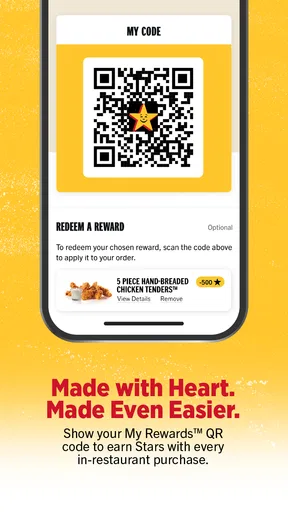
The Hardee’s® app includes a rewards program that allows users to earn points with every purchase. These points can be redeemed for free items or discounts on future orders. Users are encouraged to check the app regularly to stay updated on new promotions and reward opportunities.
How does the order pickup and delivery work in the Hardee’s® app?
The Hardee’s® app simplifies the ordering process by offering both pickup and delivery options. For pickup, you can place an order in advance and collect it at your convenience. For delivery, the app partners with local delivery services to bring your order directly to your doorstep, ensuring a seamless experience.
Are there any special deals or promotions exclusive to the Hardee’s® app?
Yes, the Hardee’s® app frequently features exclusive deals and promotions that are not available in-store. By using the app, you can access discounts, special offers, and limited-time deals tailored to app users. It's a great way to save money and enjoy your favorite meals at a reduced price.


